
Security Protocols for Browsing No-Cost OnlyFans Tiers
OnlyFans free pages let you browse without a base subscription, but they still require a card on file and a login you need to protect. You are not protecting a recurring charge so much as the card you handed over at verification and the account credentials tied to your email. BestOnlyFans refreshes its rankings every month. BestOnlyFans refreshes its rankings every month.
A free page costs nothing to open, so users click faster and through more third-party links than they would with a paid tier. The checks below are worth running before you follow any link to a zero-dollar page. The research process behind those checks looks at account age, posting history, and how consistently a page delivers what it advertises.

Unique Risks of Free Page Discovery Channels
You cannot open the site and scroll a list of creators. That gap is why ranking sites, subreddits, and social media threads exist, and why discovery carries its own risk profile. Every external channel is a middle layer between you and the platform, and each can be imitated, hijacked, or simply wrong.

A search result that looks like a creator profile may be a landing page designed to capture an email address. A Reddit recommendation may be genuine or may be an account operated by someone promoting their own link.
| Discovery Method | Security Risk | Mitigation Approach |
|---|---|---|
| Social media links in bios | Impersonated accounts pointing to lookalike domains | Type the official URL manually rather than clicking |
| Reddit communities | Astroturfed recommendations from self-promoters | Treat upvotes as unverified; check account age and history |
| Search engine results | Paid ads and SEO spam above organic listings | Prefer direct domain entry; ignore sponsored placements |
| Direct messages | Unsolicited links from unknown accounts | Never open links from accounts you did not contact first |
| Third-party ranking sites | Redirect chains and injected affiliate tracking | Inspect the destination domain before interacting |
The pattern across all five rows is the same: the further you are from typing the address yourself, the more opportunity exists for someone to stand in the middle.
Verifying a Link Before You Click
Look for the exact domain, not a variation with an added word, a hyphen, or a different extension.
Payment Card Protection During Verification
The hold is not a charge and does not grant access, but it does mean your card details sit on an account that may never generate revenue for the platform.
The practical question is how to limit what that card can do if something goes wrong elsewhere.
- Use a single-use virtual card number from your issuer where available, so the number cannot be reused if leaked.
- Monitor the verification hold transaction and confirm it reverses within the expected window.
- Review your statement within the same billing cycle rather than waiting for a monthly summary.
- Enable issuer alerts for any transaction above a threshold you set, including small authorizations.
Tip: a $0.10 verification hold is normal, but a second small charge you did not initiate is not. Treat any unexplained authorization as a signal to freeze the card and review recent activity before assuming it is a processing error.

What the Platform Fee Structure Means for You
OnlyFans takes a 20% platform fee on everything and the creator keeps 80%. For a free page, it means the creator’s income comes entirely from optional purchases, which is why PPV messages and paid chat appear more often there. PPV messages unlock up to $50; paid chat commonly runs $3-$5 per message. Tips can reach $100. Any request to move payment off the platform is a red flag.
Device and Browser Isolation Strategies
The goal is to keep your browsing activity for this platform separate from the browser session that holds your email, banking, and work logins. A separate browser profile achieves most of the benefit, because profiles keep cookies, cached files, and saved sessions apart from each other.
- Create a dedicated browser profile used only for this platform, with no saved passwords carried over.
- Decide on a cookie policy and stick to it, clearing session cookies when you finish browsing.
- Set a cache clearing schedule rather than relying on memory, since cached pages can persist for weeks.
- Consider a separate device if your household shares access to your primary machine.
- Use container tabs where your browser supports them to wall off individual sessions within the same window.
If a malicious extension or a stray download lands in that profile, it does not inherit the credentials stored in your main one.

Account Credential Management
A free page still sits behind a login worth protecting as carefully as a paid one. Reused passwords are the single most common way an account gets taken over, because a breach at one unrelated service hands an attacker a working combination for every other site where you repeated it.
Turning On Two-Factor Authentication
It is the strongest single step available to you, because a stolen password alone stops being sufficient. If the platform offers app-based codes rather than SMS, prefer the app. SMS codes can be intercepted through SIM-swap attacks, which is why two-factor authentication is best deployed through an app wherever you have the choice.
Phishing Recognition Specific to Free Page Promotion
Because free access is genuinely available, a scam message claiming to unlock free access does not sound implausible. That is what makes this category effective. The message creates urgency, asks for something the platform would never request, or moves you to a domain that is not the official one.
- Fake verification pages that ask for your card number and a password on the same screen.
- Impersonated creator accounts that mirror a real profile’s photos and send unsolicited links.
- Too-good-to-be-true offers promising lifetime free access in exchange for a login.
- External payment requests asking you to send funds outside the platform’s own checkout.
- Credential harvesting pages that mimic the login screen but sit on a different domain.
Warning: the platform will never ask for your password by message, and a genuine verification step happens inside the official site after you log in. Any page requesting credentials before login is imitating the process, not performing it.
Some listing sites walk through how to spot genuine free pages, and if you want background on is there any free only fans access, that reading is useful context. The verification requirement still applies on a zero-dollar tier, so treat any page that implies otherwise as suspect.
Network and Connection Security
Traffic on a public network can be observed by others on the same network if the connection is not properly encrypted.
| Connection Type | Risk Level | Recommended Action |
|---|---|---|
| Home WiFi | Low | Keep router firmware updated and use a strong network password |
| Mobile data | Low | Generally the safest option away from home; no action needed |
| Public WiFi | High | Avoid logging in; use mobile data or a trusted VPN instead |
| Workplace networks | Medium | Assume monitoring; keep personal activity off managed devices |
| VPN routing | Low to Medium | Choose a reputable provider; a poor VPN adds risk rather than removing it |
It is not a substitute for the other habits in this guide, and a free VPN of unknown origin can log or resell your activity.
Notification and Communication Hygiene
Free pages generate more messages than paid ones because creators rely on tips and PPV rather than subscription revenue.
- Configure email filters so platform notifications do not mix with messages from unknown senders.
- Keep direct message replies inside the platform rather than moving to a personal number or email.
- Block accounts that repeatedly push external platforms after you decline once.
- Turn off promotional message categories you do not read, reducing the surface for impersonation.
Incident Response for Security Concerns
Sequence matters because changing a password before reviewing active sessions can lock you out of the evidence you need.
- Change the account password immediately, from a device you trust rather than the one you suspect.
- Consider freezing the payment card if any charge, even a small one, was not yours.
- Submit a report through the platform so the account activity is logged and reviewed.
- Notify your bank if unauthorized transactions appear, and request a replacement card.
- Audit credentials across other services for any password you reused here, and change those too.
A timeline makes both the platform report and the bank dispute faster to resolve.

Why Volume Makes Verification More Important
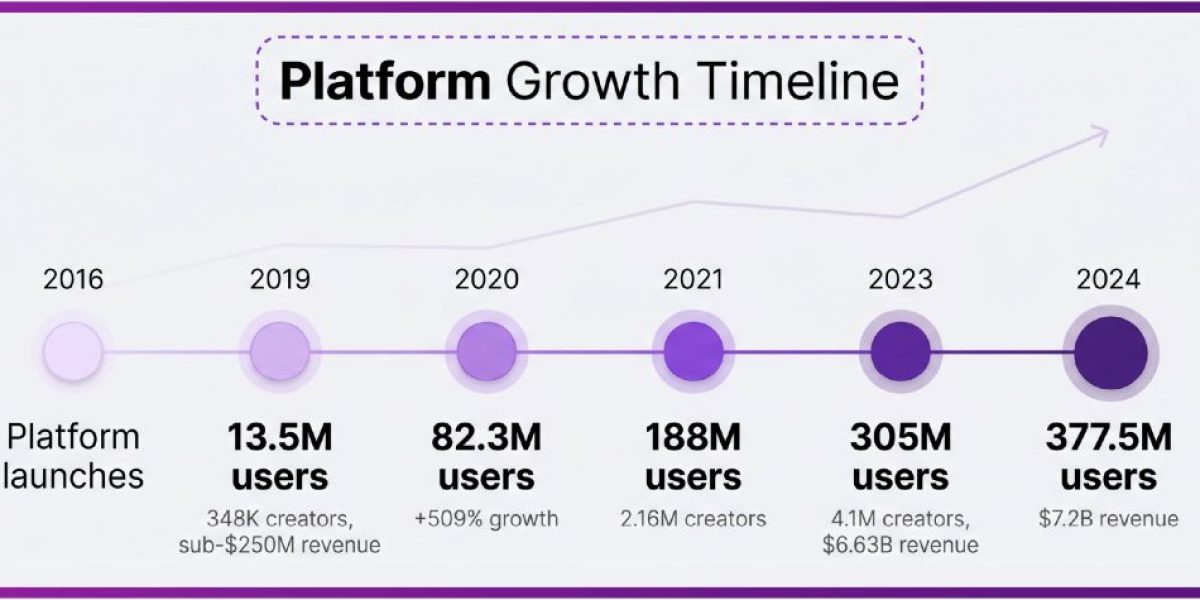
The platform’s user base expanded sharply around 2020 and kept growing afterward, which means the pool of accounts a scammer can imitate has grown with it. BestOnlyFans treats ranking as a starting point rather than a verdict.
Pricing Changes and Access Interruptions
When a creator raises the base price, auto-renew stops and existing access lasts until the paid period ends. Base subscription prices run from $4.99 to $49.99, with most paid pages clustering between $5 and $10. Promotional first months can dip below $4.99, for example a $3 first month, but a base price below $4.99 is not something the platform supports.
FAQ
Is my information safer on free pages than paid subscriptions?
Not inherently. The verification requirement and card-on-file process are the same. What differs is your own behavior: free pages encourage faster clicking and more third-party discovery, which raises practical risk.
Can I get viruses from clicking on free OnlyFans links?
The risk comes from external pages that imitate the platform or offer downloads, which is why typing the address manually and avoiding unsolicited links matters more than the destination platform.
Should I use a VPN when browsing OnlyFans free pages?
If you do use a VPN, choose a provider with a clear privacy policy, because a low-quality service can observe the same traffic you are trying to protect.
What should I do if I clicked a suspicious link from a free page promotion?
Change your password from a trusted device, review active sessions, and watch your card statement for small authorizations.
